

FlightAware shares a lot of flight data – you can search on our website and see information about flights that are taking place almost anywhere in the world, stretching back for years. Sometimes, though, we block flights from public view, often at the request of their owners. Ensuring that this data remains private is one of the most important things to test at FlightAware. This post will give some background about flight blocking, an explanation of how our users view their own blocked flights and share them with others, and some insight into how these rules translate into test scenarios for FlightAware QA.
What is flight blocking?
When a flight is blocked, that means that it is hidden from most users. It won’t show on maps or in lists of flights (such as the arriving or departing aircraft at an airport, or a list of flights of a particular aircraft type), and if someone that doesn’t have access to the flight tries to open its flight page directly, they’ll get an error. However, if you are the owner and have registered the aircraft with FlightAware, then you’ll be able to see its flights just like any other, both on the flight page and everywhere else on the website.
By enrolling their aircraft with the FAA’s Limiting Aircraft Data Displayed (LADD) program, US aircraft owners can request that their aircraft’s flight data be filtered from public view but still available to vendors (like FlightAware) that use their data feed. In that case, FlightAware will have the data, but it will be universally blocked until the owner claims it by signing up for our Global subscription and confirming their ownership. At that point, they will be able to view their flights, as well as grant limited access to other users. Similarly, pilots in places like Europe where non-commercial aircraft are blocked from public tracking by default can use our Global subscription to view their flight data on our website.
In addition to being used to claim and get access to aircraft that are already blocked, our Global subscription also allows any owned aircraft to be blocked at the owner’s discretion, separately from anything like LADD.
Testing Flight Blocking
To test flight blocking functionality, you need to consider various scenarios on pages throughout our applications. Some of the most common ones have already been listed above – blocked flights shouldn’t show (for most users) on maps or in lists of flights, and if someone that doesn’t have access to the flight tries to open its flight page directly, they should get an error. Whenever a change goes through that impacts any list of flights or the flight page, it’s important that these scenarios be tested, both for the flights being properly blocked for most users and properly visible to their owners. However, there are several ways global subscribers can allow other users to view their flights, which in turn leads to further test scenarios.
Sharing Blocked Flights
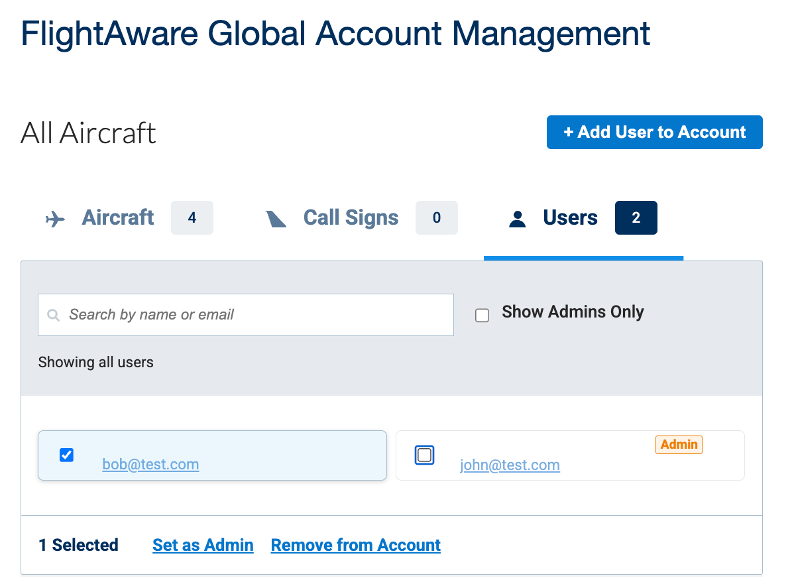
The most direct way a global user can share a flight with others is by adding them to their global account, either as an admin or as a regular user. Admins can interact with the global account with many of the same options as the aircraft owner, while regular users can see the otherwise-blocked flights on the account but cannot edit the account itself. Additionally, users may be grouped with aircraft to control which flights are unblocked for them or be given universal access to view all flights on the global account. Each of these scenarios must be considered for testing if relevant changes are going through.
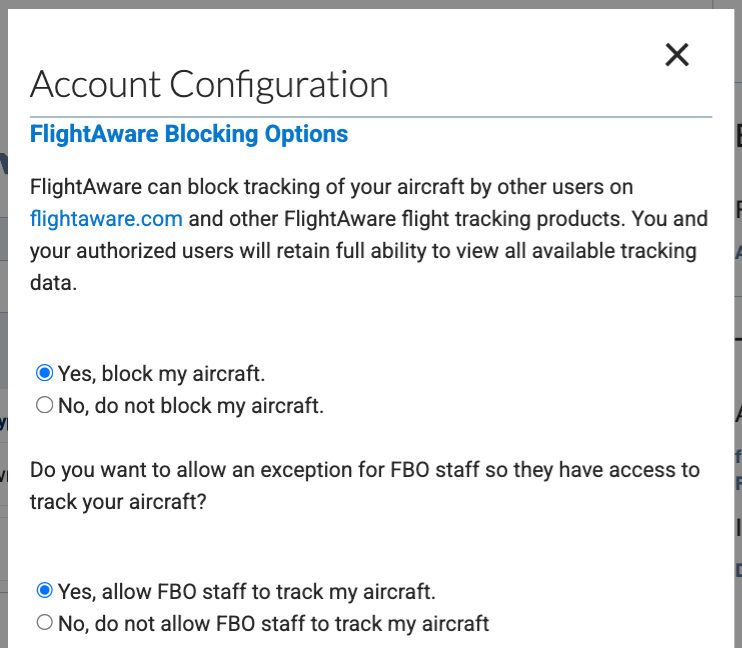
Another way that global users can share a flight with a subset of users (while still blocking them to the general public, as seen above) is by allowing Fixed Base Operator (FBO) staff to view the flights. This functionality is a little more nuanced, as it allows FBO staff at the airports of their blocked flights to view those specific flights. FBO staff can view these flights through the airport page, where these flights are marked in bold to indicate that they are normally blocked. From there they can link to the flight page, but when viewing the flight, any past flights the aircraft has taken to that don’t involve the airport the FBO user is associated with will not be visible in the flight history section of the page. When testing changes to the airport page, flight page, or to FBO user functionality, it’s important that this selective unblocking remains intact, revealing (only) specific flights to the FBO users at that airport.
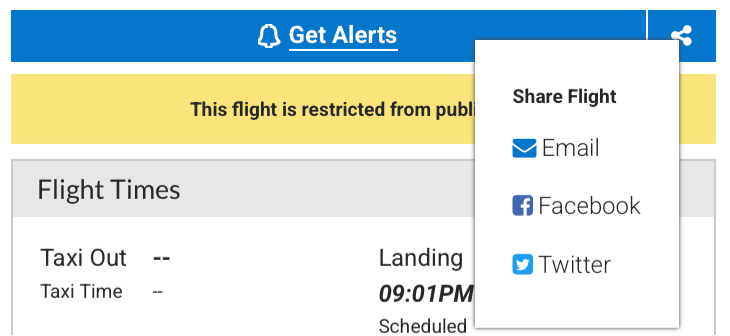
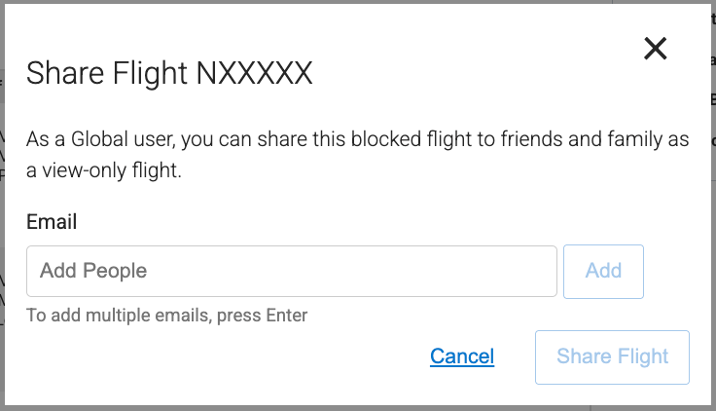
One other way that a global user can share a blocked flight with another user is to use the “Share Flight” option on the flight page. When you share a flight using email, it will include a link to the flight page that allows anyone to view the flight, no matter its block status.
There are a few specifics of this view of the flight page to be considered when testing. First, the flight history section of the flight page isn’t visible in this view, so that only this one flight’s information is shared. The amount of information visible via the link will also depend on the user viewing it. If the person you’re sharing it with doesn’t have a FlightAware account, they will only see the basic information about the flight that they would see on any publicly visible flight page when not logged in and will have restricted access to information like flight layers and runway information. Whenever changes to the flight page are made, this view needs to be tested to ensure that the basic functionality remains intact, and that the various rules restricting it remain in place.
Conditional and Partial Blocking
There are also a few situations where flights from an aircraft that is blocked in some situations may be visible or partially visible in others, which result in corner cases that need to be tested as well. These situations primarily have to do with the time-sensitive nature of the LADD, or the different idents a single flight might be associated with.
Time-Sensitive Blocking
One difference between Global-based blocking and LADD-based blocking is that LADD blocking is date-sensitive, while Global blocking is not. This means that when an aircraft is blocked via LADD, only flights that line up with the dates that it was registered with LADD will be blocked; if it had flights before it was registered, or it later leaves LADD, those flights will not be blocked, but the ones while it was on LADD will always remain blocked. If a flight is blocked via Global, all present and future flights for that aircraft will be blocked; if that Global blocked status is removed, then barring other reason it might be blocked, all past and future flights will again become unblocked.
Testing this functionality involves adding and removing flights from our test LADD database or global accounts (or both) and ensuring that the flights end up blocked or unblocked as appropriate for general users. While this logic isn’t frequently updated, any changes to it would require regression testing to ensure the functionality remains intact.
Flight Idents vs Aircraft Registration
In addition, there may be situations where an aircraft registration is blocked but a flight ident is not, as the same flight ident may utilize different aircraft on different days. In this case, a user may view a flight itself via the flight ident page, but it will be in a partially blocked state – anything about the aircraft registration will not be visible on the flight page.
The test cases here involve ensuring that the different combinations of variables all work together properly – blocked vs unblocked registrations and idents, users that should or should not be able to see the blocked information, and whether the page being viewed corresponds to the registration or ident. The aircraft owner should have full visibility on both pages, while other users should have restricted visibility on the unblocked page and get an error if they attempt to open the blocked page directly.
Conclusion
At FlightAware, we ensure that blocked flights are properly restricted from public view, and we allow the owners of these aircraft to selectively unblock their flights as needed, be it to their associates, FBO users, or other individuals. Identifying and testing the intersections of different flights, different pages, different users, and different ways of blocking or unblocking flights to ensure that they all work as expected is one of the most important tasks of FlightAware QA.