

When we first shared our move to a monorepo, our goal was to simplify dependency management, align tooling, and ship faster. A year later, that foundation has grown into the standard way the Web Wing builds. We’ve added more apps, introduced custom Nx tooling, and learned how to keep a single shared codebase healthy as it scales. This post looks at how we’ve evolved that setup, what tooling decisions have scaled with us, and what we’ve learned along the way.
The Web Wing Ecosystem
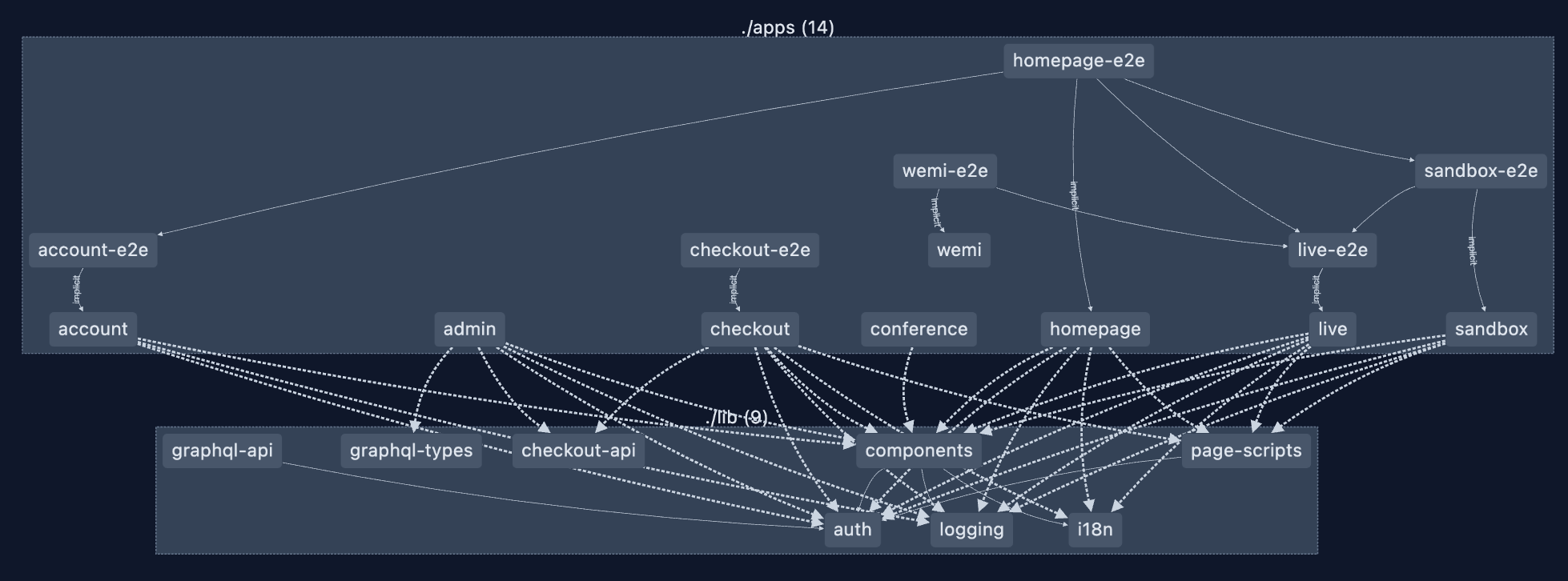
The Web Wing spans multiple Crews and owns nearly every public-facing surface of FlightAware - Flight Tracker / Flight Status. All of our new web applications are built with Next.js. These apps are built, tested, and deployed from a single repository. Today, the monorepo has 8 applications and 9 shared libraries. The monorepo gives every Crew access to the same libraries and build tools, which makes it easy to share UI patterns and behavior without duplicating work.
Tooling and Structure
We use Nx to manage the workspace. The repo follows the standard layout of apps/, libs/, and deploy/. Nx’s dependency graph and “affected” detection allow us to deploy only what’s changed.
All apps share a single package.json. That choice has trade-offs, but it ensures every app stays on the same framework and library versions. When we upgrade Next.js or React, every app upgrades together. It takes more coordination but removes the long-term drift that tends to appear in multi-repo setups.
Over time we’ve added custom Nx generators that scaffold deployable apps, including CI configuration. These are used both for production work and internal events like the FlightAware Hackathon, where teams were able to spin up deployable apps in minutes.
Workflow and Deployment
Engineers usually run a single app locally with nx serve, though Tilt can be used to run multiple apps together when needed. Local setup takes about five minutes—the time to install dependencies and start the dev server.
All CI and deployments run through GitHub Actions. We use Nx affected detection to build and test only changed projects. Builds complete in under ten minutes, so we haven’t needed remote caching or parallelization yet.
Once a change has been committed, a PR build is generated and our test suite runs. A CODEOWNERS file is used to ensure that the appropriate crew/person is tagged for review of the PR.
End-to-end tests written with Playwright are integrated into the Nx graph and run as part of CI. (See our Playwright Blog Post for details.) ESLint handles linting across all apps.
Deployments use a single pipeline. All affected apps are deployed together. Production releases happen by updating a branch that Flux watches that is coupled to the environment we are deploying to. Flux picks up the new versions and ships the containers to Kubernetes. Rolling back is as simple as updating the app version in Git. Thanks to Nx’s affected detection, we only deploy applications that have actually changed since our last deployment.
Challenges and Lessons
The biggest challenge of a shared package.json is coordination. Updating a library that’s used by several apps requires more communication. We’ve mitigated that by updating frequently so each change is small and easier to reason about.
Complex upgrades, especially large Next.js releases, touch every app at once. Our automation and PR deploys help validate those quickly. Running Playwright tests across all apps gives us confidence that the upgrade didn’t break anything unexpected.
Nx’s affected detection has kept build times predictable even as the repo grew. We’re still using sequential builds, but as the number of apps continues to grow we’ll revisit parallelization.
The most important lesson wasn’t technical. Frequent communication and shared ownership matter as much as tooling. A single repo works only if every engineer feels responsible for keeping it healthy.
Developer Experience
New engineers start by contributing to existing apps. The process is simple: clone the repo, install dependencies, run nx serve, and open the app in a browser.
Consistency comes from shared ESLint and test configurations. The monorepo README doubles as a changelog for major updates so everyone stays in sync.
Setup is lightweight and feels like any other modern Node-based project.
Coordination Across Crews
All engineers in the Web Wing participate in #monorepo-collab, a Slack channel dedicated to coordination and announcements. Codeowners help manage boundaries between apps and shared libraries. Broader topics or structural changes are discussed in our monthly Web Alliance meeting.
Cross-Crew collaboration happens naturally now. Components built for Checkout might end up in the Admin app. Analytics helpers developed for the Homepage are reused in Conference. The monorepo made this normal instead of exceptional.
Impact
Builds now complete in under ten minutes, and new applications can be scaffolded and deployed in just minutes using our Nx generators. Regular upgrades to Next.js and other dependencies keep our technology stack current and technical debt low. Engineers across different Crews work within a consistent environment, which makes cross-team collaboration smoother and more efficient. Shared tooling and libraries have also led to a more unified user experience across FlightAware’s public-facing applications, strengthening both our internal developer workflow and the overall product experience.
What’s Next
As FlightAware moves on from Tcl and to more modern applications, we expect to add more targeted Next.Js applications for upcoming products. Our shared libraries will continue to grow and evolve to serve the needs of consuming applications. Our CI/CD tooling will mature to give finer-grained control over which app ships.
Closing Thoughts
Our monorepo has become the foundation for how the Web Wing builds. It heavily promotes reuse and code sustainability. Centralized tooling, frequent communication, and a bias for small, continuous updates have kept it maintainable as it grows.